Introducing MLRun Community Edition
MLRun CE is the out-of-the-box solution of MLRun for AI and ML orchestration and model lifecycle management.


MLRun Community Edition (CE) is the out-of-the-box solution of MLRun for AI and ML orchestration and model lifecycle management.
MLRun CE can be installed directly on your Kubernetes cluster or even on your local desktop. It provides a complete, integrated MLOps stack that combines MLRun’s orchestration power with Nuclio’s high-performance serverless engine, along with additional tools for data storage, monitoring, and more.
In this blog, we’ll explain how MLRun CE works and recommended use cases, and share how one of our users leverages MLRun CE for experiment and model tracking.
MLRun CE is ready to use out of the box. It is designed to simplify the entire lifecycle of LLM and ML projects, and provides a robust solution for complex MLOps needs (see examples below).
By easily installing the MLRun CE Helm chart on your Kubernetes cluster or local desktop, you get a powerful, integrated environment for development. The platform is built on two cores: MLRun for MLOps orchestration and Nuclio for serverless computing.
MLRun is the MLOps orchestration framework that automates the entire AI pipeline, from data preparation and model training to deployment and management. It automates tasks like model tuning and optimization, enabling you to build and monitor scalable AI applications. With MLRun, you can run real-time applications over elastic resources and gain end-to-end observability.
Nuclio is a high-performance serverless framework that focuses on data, I/O, and compute-intensive workloads. It is the engine that powers the real-time functions within MLRun. Nuclio allows you to deploy your code as serverless functions, which are highly efficient and can process hundreds of thousands of events per second. It supports various data sources, triggers, and execution over CPUs and GPUs. It also supports real-time serving for generative AI use cases.
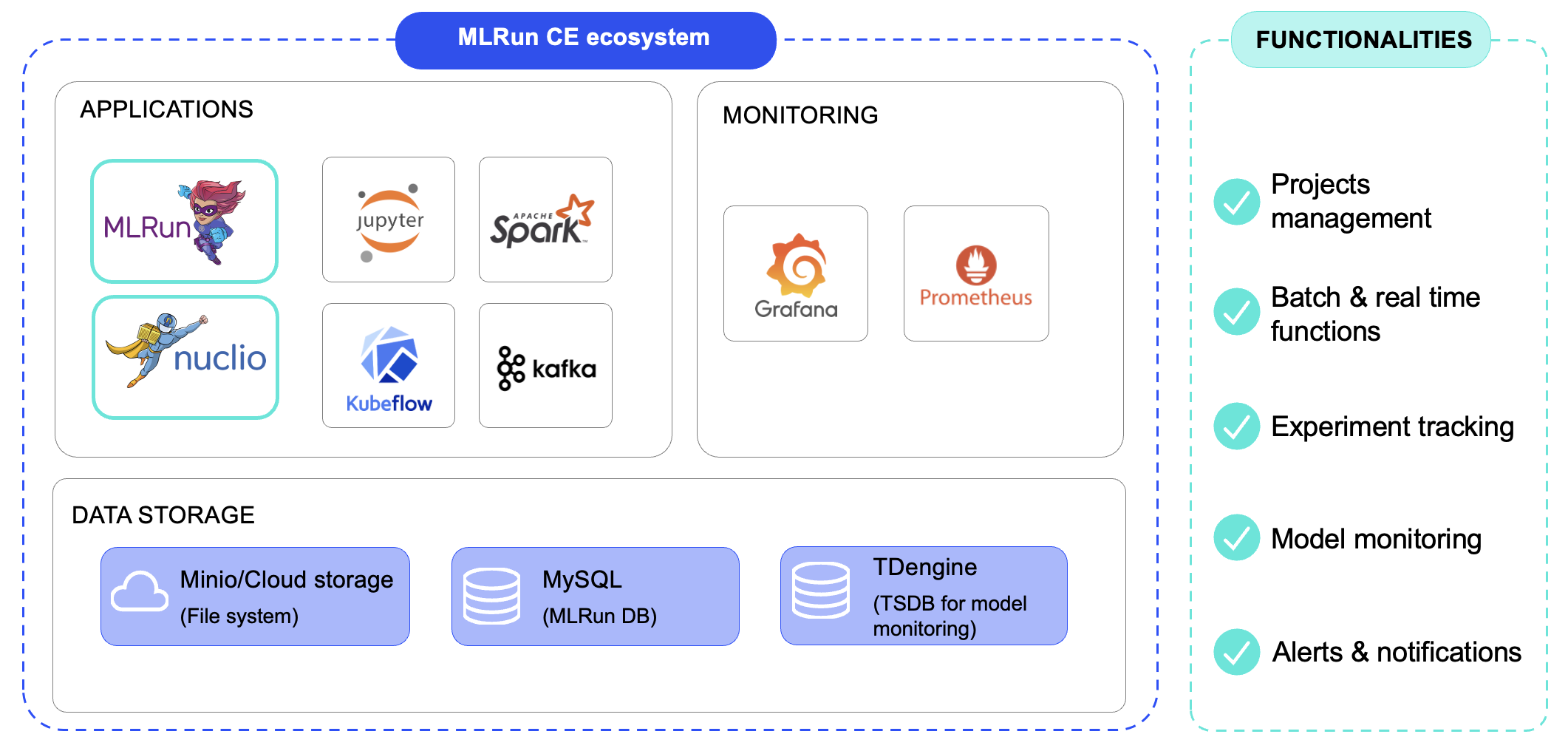
MLRun CE easily integrates with several other tools. It includes an internal JupyterLab service for developing your LLM code and supports Kubeflow Pipelines workflow for creating multi-step AI pipelines. It also works with Kafka and TDengine for robust, real-time and batch model monitoring, and provides built-in support for Spark and Grafana for data processing and visualization.
Data and developer users of MLRun CE can benefit from:
Seamless Integrations: The platform integrates with a wide range of popular open-source tools, including Kubeflow Pipelines for workflow management, and Spark and Grafana for data processing and visualization. This open architecture gives you the flexibility to use the tools you already know and love.
The following are the components that get installed when installing MLRun CE
The picture below describes the relations between them. MLRun is the orchestrator and deploy function by using MLRun, Nuclio, Spark and MPI jobs runtimes. Grafana is used to monitor usage, Jupyter for out-of-the-box development platforms and Minio, MySQL & TDengine to store data.
MLRun CE can be used for a wide variety of MLOps use cases. In particular:
One of our community users has adopted MLRun CE as their MLOps platform to deploy, track, and manage their ML training experiments and models. MLRun CE is deployed across Kubernetes environments.They run two main types of ML workflows run through MLRun CE. The first is manually triggered training jobs. MLRun CE runs the training function, logs metrics and datasets, and registers the model for deployment on edge devices.
The second is automated periodic insight models, such as drift detection functions that compare recent data against training distributions and generate alerts when anomalies occur.
The team relies on MLRun CE’s full set of components: project management, batch functions, experiment tracking, model monitoring, and alerts.
With MLRun CE, their data science teams can:
Check out these resources for more information:

MLRun is an open-source framework that orchestrates the entire generative AI lifecycle, from development to deployment in Kubernetes. In this article, we’ll show how MLRun replaces manual deployment processes, allowing you to get from your notebook to production in just a few lines of code.
As a data professional, you’re probably familiar with the following process:
The traditional process described above is fraught with challenges:
MLRun addresses these challenges by allowing you to easily run your local code in K8s production environments as a batch job or a remote real-time deployment. MLRun eliminates the need to worry about the complexity of Kubernetes, abstracting and streamlining the process. MLRun also supports scaling and configuring resources, such as GPU, Memory, CPU, etc. It provides a simple way to scale resources, without requiring users to understand the inner workings of Kubernetes.
What’s left is simply to monitor the functionality and behavior of your AI system once it’s live, which can also take place in MLRun.
Here’s how MLRun achieves this:
Here’s what the same process looks like, but with MLRun:
| Before MLRun | After MLRun |
| You want to run a batch fine-tuning job for your LLM, but your code requires a lot of memory, CPU, GPUs. It also needs a number of Python requirements packages to run and fine-tune the LLM. | By using MLRun this flow is very simple. You only need to connect your local IDE to MLRun, create a project, create an MLRun function set and run your code using the relevant resources. With this flow, you can develop and run your code in a Kubernetes from the beginning of the development phase with only a few code lines. |
| You must run your code on your K8s cluster because your local computer doesn’t have enough resources. For this, you need to create a K8s resource and maybe a new Docker image with the new Python requirements. | To run your code in a Kubernetes cluster, create an MLRun function that runs your Python code. Then, add the amount of resources (memory, CPU and GPU), and add Python requirements. MLRun will use those values and run your fine-tuning job in Kubernetes and manage the deployment. |
| Once you’ve successfully run the function on the K8s cluster, you need to version and track your experiment results (LLM and the fine-tune job results). This is essential to understand where and why you need to improve your fine-tune job. | Now that you have a model that has been fine-tuned by the MLRun function, you can track the model artifact as part of the MLRun model artifactory, with the model version, labels or the model metrics. |
| In some projects, the model inference is done in a batch, in others it’s in real-time. If this is a real-time deployment, you need to create a K8s resource that serves the model with the user prompts or create a batch job that does the same. Both should run in the K8s cluster for production testing, and you need to manage those resources by yourself. | In some projects, the model inference is done in a batch, in others it’s in real-time. In MLRun, you can do both. You can serve your LLM in real-time or collect the prompts and run the same in batch for the LLM evaluations, in just a couple of lines of code. |
| Once you serve the model, you need to monitor and test how your model is behaving and if the model outputs meet your criteria for deployment in production, using accuracy, performance or other custom metrics. | Once you serve the model, monitor your LLM outputs and inputs and check the model performance and usage by enabling MLRun model monitoring. This is an essential part of the model development, helping you better understand if you need to retrain the model or the model outputs so they meet your criteria for deployment in production. |
| Once your project is ready to deploy in production systems you need to run some of the steps above in the production cluster again | Once your project is ready for production, you can easily move your project from dev system and move the same project configuration to production system, by using MLRun CI/CD automation. |
MLRun can take your code and run and manage your functions and artifacts in Kubernetes environments from your first deployment. This allows you to focus on development and decreases the time needed to deploy AI projects in production, while maintaining a production-first mindset approach.
1. On your laptop, install MLRun and configure your remote environment. Now you have your MLRun environment ready to develop your project from your laptop to production.
2. Create your MLRun project by using the MLRun SDK.
3. Run your Python code as an MLRun function. For a remote or batch function you can run your code locally or on your k8s cluster from the beginning of the development phase (always keep production mindset approach). You can also log models and different artifact types to your system experiment tracking management.
4. Based on the run and the experiment tracking you can monitor your result and make the way to production more easy and convenient.
More Resources:
MLRun simplifies and automates the various stages of the AI lifecycle. Here are some key use cases where you can use MLRun: